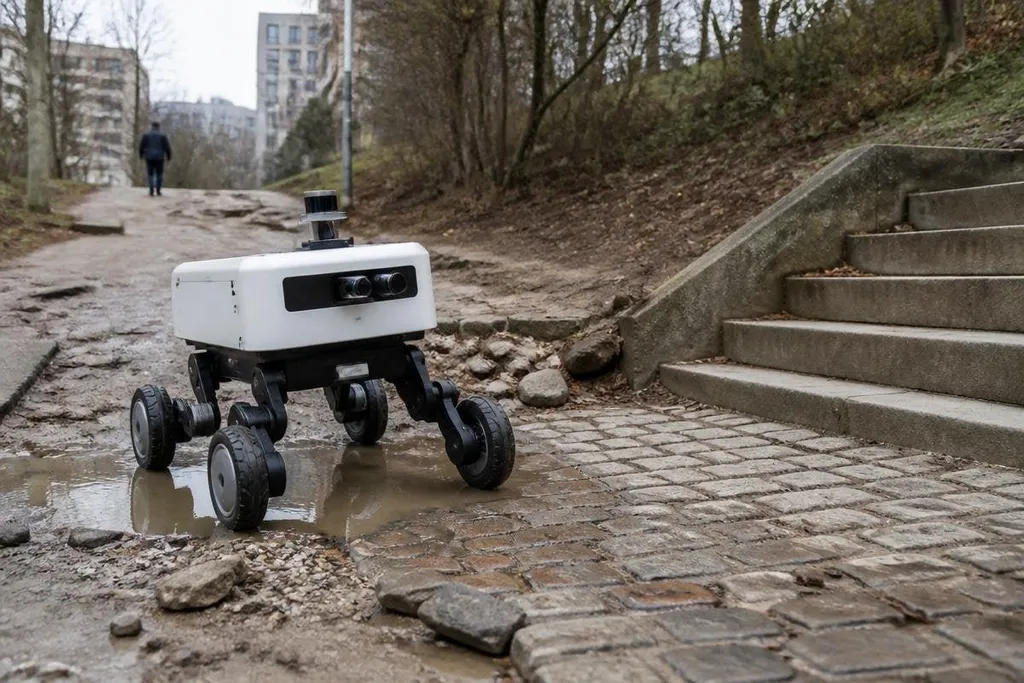
A mobility robot has to keep its balance, read the ground, and recover when the plan meets a real obstacle. That makes the race harder than building a machine that moves well in a controlled test area.
The industry reader watching this field needs a way to separate useful progress from a polished demo. The clearest test is simple: where can the robot go, what can it carry, and how much human help does it need?
- Movement is only the start: wheels, legs, and hybrid designs each solve a different ground problem.
- Energy sets the work limit: every extra motor, sensor, and safety system draws from the same battery.
- Autonomy needs proof: operator control for every hard step means the robot is not ready for unattended work.
The ground decides the design
Wheeled robots are efficient on smooth floors, roads, and prepared paths. Their control system can focus on steering, stopping, and avoiding people instead of managing a separate balance problem for every step.
Legged robots can handle stairs, gaps, loose ground, and changes in height that stop many wheeled platforms. The cost is mechanical complexity: each leg needs motors, position sensing, and control software that keeps the body stable while the feet move.
Hybrid robots try to use both methods. A platform may roll across a warehouse floor, then use legs to cross a threshold or climb steps. That wider range of movement can help in sites built for people, but every added mechanism brings more weight, power use, and parts to maintain.
The best design depends on the job. A delivery robot serving hospitals may value quiet rolling and long battery life. A machine checking damaged buildings may need legs, a camera system, and a way to work where maps are incomplete.
Mobility is an energy problem
Movement takes power before the robot lifts a tool or carries a load. Legs spend energy raising the body with each step, while wheels lose less power on a smooth surface but can struggle on slopes, soft ground, or broken flooring.
Battery size changes the whole machine. A larger pack can extend operating time, but it also adds mass, which makes every motor work harder. Designers have to choose between travel time, payload, speed, and the time needed to recharge.
That trade-off matters to an operations manager planning a work shift. A robot that drives for a short inspection and returns to a charging station may fit the job.
Patrols lasting hours need a different battery plan, along with a clear answer for what happens when the charge falls too low. The useful number is not the battery capacity by itself. It is the working time left after sensors, computers, motors, communication links, and safety systems have done their jobs.
Autonomy has to survive bad conditions
A mobility robot builds a picture of its surroundings with cameras, LiDAR, depth sensors, or other equipment. Software uses that input to plan a route and control the motors. The hard cases start when the floor changes, a person blocks the path, or a sensor view becomes poor.
Teleoperation means a person controls the robot from a distance. It can help during testing and in places where a mistake carries a high cost, but it also changes the staffing model. A fleet may need one operator for each robot, or one person may supervise several machines only when the robots can handle routine movement alone.
A robot that needs one operator per unit carries a different labor cost from one supervised by a single person. For that comparison, use Robot 24 alongside records that name the robot, operator setup, test date, route, and result. Without those details, a mobility demo can hide how much of the movement came from the person at the controls.
A video can show that a robot crossed one obstacle. It cannot, by itself, show how often the robot fails, how much operator help it needs, or how well it works after hours of dust, heat, rain, or repeated impacts. Those details decide if a machine belongs in a work plan.
Use this check before a purchase
A buyer comparing mobility robots should ask for working evidence in the setting that matters to them. Use this short guide:
- Name the surface: state the floor, slope, steps, loose ground, or outdoor route the robot must handle.
- Set the load: write down the tool, cargo, or sensor package in kilograms, including its mount.
- Measure the shift: ask for working time with the full load and sensor package fitted.
- Count human actions: record when an operator must take control, reset the robot, or clear its route.
- Check recovery: ask what the robot does after a blocked path, lost sensor view, low battery, or fall.
I'd treat any claim about better mobility as unproven until it includes those answers. Movement on one test course may still fail to prove that the robot can handle your team's route every day.
The next useful milestone is not a faster demo. It is a published record showing where the robot worked, how often people intervened, and how long it stayed in service.